7 个 AI 智能体如何在一小时内合作做出一个应用

如果我告诉你,只用 AI 智能体,就能在一小时内做出一个完整、能跑的 Web 应用,你会怎么想?不只是简单的「Hello World」,而是一个带后端 API、响应式前端、单元测试和文档的全栈应用?
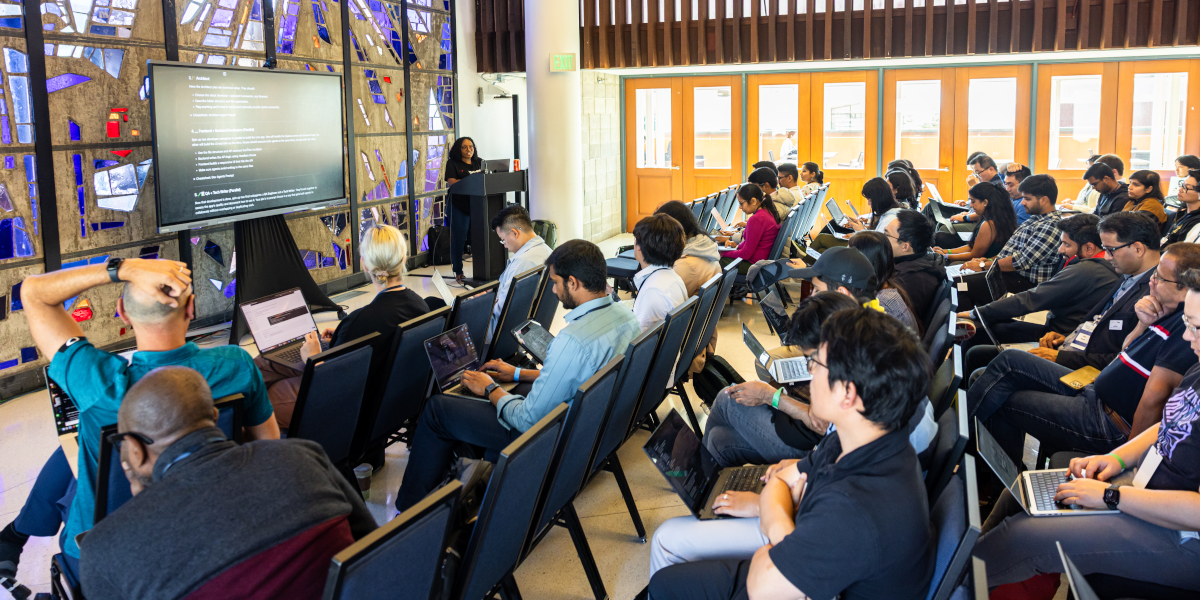
这正是我们在 伯克利智能体 AI 峰会的 Vibe Coding 工作坊里做成的事。我演示了如何用 goose 的子智能体编排,拉起一整支 AI 智能体开发团队。每个智能体承担一个具体角色——从产品规划到 QA 测试——并一起构建「AI BriefMe」,一个能就任何主题生成高管风格简报的 Web 应用。
多智能体开发的力量
传统 AI 编程助手很擅长帮你写单个函数或调试具体问题。但如果你要从零构建呢?如果你想模拟整个软件开发生命周期呢?
这正是 goose 子智能体功能发光的地方。你不必自己做所有事,可以编排一支各有专长的专门 AI 智能体团队:
- 🧠 规划者——定义产品愿景和 MVP 范围
- 📋 项目经理——拆解任务并协调执行
- 🏗️ 架构师——搭建项目结构和技术栈
- 🎨 前端开发者——构建界面
- 🧩 后端开发者——构建 API 逻辑
- 🧪 QA 工程师——编写测试并找出上线阻碍
- 📝 技术写作者——记录设置、用法和 API 细节
工作坊体验
在现场工作坊里,参与者跟着我们一步步构建 AI BriefMe。这种方法的美妙之处在于,你不只是看别人写代码,而是在学习如何有效地提示和编排 AI 智能体。
工作流是这样展开的:
步骤 1:产品规划
首先,我们拉起一个规划者智能体,定义我们在构建什么。规划者没有一头扎进代码,而是做出了一份清楚的产品定义:
产品计划
# AI BriefMe MVP - 40-Minute Build Plan

## Goals
Build a functional web app that generates daily briefings on any topic in **40 minutes**. Users input a topic and get an instant, well-formatted briefing.

## Core MVP Features (Must-Have)
1. **Simple web interface** with topic input field and generate button
2. **AI-powered briefing generation** that returns:
  - Title
  - Today's date
  - 2-3 bullet-point takeaways
  - Optional code snippet or chart for technical topics
3. **Clean display** of the generated briefing
4. **Basic error handling** for API failures

## Technical Stack (Keep It Simple)
- **Frontend**: Single HTML page with vanilla JS (no frameworks)
- **Backend**: Python Flask app with single endpoint
- **AI**: Headless Goose as an LLM service
- **Deployment**: Local development server (no cloud deployment)

## Team Responsibilities

### PM
- Define exact briefing format and user flow
- Create sample topics for testing

### Architect
- Design simple API contract between frontend/backend
- Choose AI prompt structure for consistent output

### Frontend Dev
- Build single-page interface with form and results display
- Handle loading states and basic error messages

### Backend Dev
- Create Flask app with `/generate-briefing` endpoint
- Integrate with AI API and format response
- Add basic input validation

### QA
- Test with 3-5 different topic types
- Verify error handling works
- Check output format consistency

### Tech Writer
- Write brief README with setup instructions
- Document the API endpoint

## Design Considerations
- **Mobile-friendly** but desktop-first
- **Fast response time** - show loading indicator
- **Copy-friendly output** - users should be able to easily copy/share
- **Graceful failures** - clear error messages when AI is unavailable

## Success Criteria
✅ User can enter any topic and get a formatted briefing
✅ App handles both technical and non-technical topics
✅ Clean, readable output format
✅ Works locally without deployment complexity

## Out of Scope (Save for Later)
- User accounts or login
- Email delivery or scheduling
- Historical briefings or dashboard
- Advanced formatting or customization
- Mobile app or PWA features
- Analytics or usage tracking

---
**Timeline**: 40 minutes total
**Demo ready**: Functional app running locally with 2-3 example briefings generated
步骤 2:项目管理
接下来,项目经理智能体把工作拆成具体任务,并标出哪些可以并行、哪些必须按顺序做
项目看板
# AI BriefMe - Project Board

## Sprint Overview
**Duration**: 40 minutes
**Goal**: Functional MVP with topic input → AI briefing generation → display

---

## 🏗️ ARCHITECT (Start First - 5 minutes)
**Dependencies**: None - blocks all other dev work

### Tasks:
- [ ] **API Contract Design** (3 min)
- Define `/generate-briefing` POST endpoint structure
- Specify request/response JSON format
- Document error response codes
- [ ] **AI Prompt Template** (2 min)
- Create consistent prompt structure for briefing generation
- Define output format requirements (title, date, bullets, optional code)

**Deliverables**: `api_spec.md` with endpoint docs and prompt template

---

## 🔧 BACKEND DEV (After Architect - 15 minutes)
**Dependencies**: API contract from Architect

### Tasks:
- [ ] **Flask App Setup** (3 min)
- Create `app.py` with basic Flask structure
- Add CORS for frontend integration
- [ ] **Generate Briefing Endpoint** (8 min)
- Implement `/generate-briefing` POST route
- Format AI response to match API contract
- [ ] **Error Handling** (2 min)
- Add try/catch for API failures
- Return appropriate error responses
- [ ] **Basic Validation** (2 min)
- Validate topic input (not empty, reasonable length)
- Sanitize input before sending to AI

**Deliverables**: Working Flask backend ready for frontend integration

---

## 🎨 FRONTEND DEV (Parallel with Backend - 15 minutes)
**Dependencies**: API contract from Architect (can start with mock data)

### Tasks:
- [ ] **HTML Structure** (3 min)
- Create `index.html` with form and results sections
- Add basic semantic structure
- [ ] **CSS Styling** (5 min)
- Style input form and results display
- Add loading spinner/state
- Make mobile-friendly
- [ ] **JavaScript Logic** (5 min)
- Handle form submission
- Make API call to backend
- Display results and handle loading states
- [ ] **Error UI** (2 min)
- Show user-friendly error messages
- Handle network failures gracefully

**Deliverables**: Complete frontend ready to connect to backend

---

## 🧪 QA (After Backend + Frontend Ready - 8 minutes)
**Dependencies**: Working backend and frontend integration

### Tasks:
- [ ] **Happy Path Testing** (3 min)
- Test 3 different topic types: business, technical, general
- Verify output format consistency
- [ ] **Error Scenarios** (3 min)
- Test empty input, very long input
- Test with backend down/API key issues
- Verify error messages display correctly
- [ ] **Cross-browser Check** (2 min)
- Quick test in Chrome and Safari
- Verify mobile responsiveness

**Deliverables**: Bug report and sign-off for demo readiness

---

## 📝 TECH WRITER (Parallel with Development - 10 minutes)
**Dependencies**: API spec from Architect, can work in parallel

### Tasks:
- [ ] **README Creation** (5 min)
- Setup instructions for local development
- Required dependencies and API keys
- How to run the application
- [ ] **API Documentation** (3 min)
- Document the `/generate-briefing` endpoint
- Include request/response examples
- [ ] **Sample Topics List** (2 min)
- Create 5-10 example topics for demo
- Mix of technical and non-technical subjects

**Deliverables**: `README.md`, `API.md`, and `sample_topics.md`

---

## 📋 PM COORDINATION TASKS
**Ongoing throughout sprint**

### Tasks:
- [ ] **Define Exact Briefing Format** (2 min)
- Specify title format, bullet structure
- Decide on code snippet criteria
- [ ] **Create Test Topics** (3 min)
- Prepare demo scenarios
- Include edge cases for QA
- [ ] **Integration Coordination** (5 min)
- Ensure frontend/backend connection works
- Coordinate final testing and demo prep

---

## ⏱️ TIMELINE & DEPENDENCIES

### Phase 1 (0-5 min): Foundation
- **Architect**: API design and prompt template
- **Tech Writer**: Start README and documentation

### Phase 2 (5-20 min): Parallel Development
- **Backend Dev**: Build Flask app and endpoint
- **Frontend Dev**: Build UI (can use mock data initially)
- **Tech Writer**: Continue documentation

### Phase 3 (20-32 min): Integration & Testing
- **Frontend/Backend**: Connect and test integration
- **QA**: Begin testing as soon as integration works
- **PM**: Coordinate final pieces

### Phase 4 (32-40 min): Final Polish & Demo Prep
- **All**: Bug fixes and demo preparation
- **QA**: Final sign-off
- **PM**: Demo script and presentation

---

## 🎯 CRITICAL PATH
1. Architect completes API spec → Backend can start
2. Backend completes endpoint → Frontend integration can happen
3. Frontend + Backend working → QA can test
4. QA passes → Demo ready

## ⚠️ RISK MITIGATION
- **Integration Problems**: Frontend dev should test with mock data first
- **Time Overruns**: Cut optional features (code snippets, advanced styling) if needed
步骤 3:技术架构
架构师智能体建立了技术基础:
- 技术栈:原生 HTML/CSS/JS 前端,Express.js 后端
- API 设计:简单的 POST 端点,接受
{"topic": "string"} - 文件结构:组织好的项目,关注点分离清楚
- 依赖:Express、CORS,以及用于调用无界面 goose 的 child_process
架构师还定义了 API 契约,这使得下一步前端和后端开发者智能体能并行工作。
步骤 4:并行开发
事情在这里变得真正有趣。我们同时拉起两个开发者智能体:
前端开发者做出了:
- 干净、响应式的界面,带现代 CSS
- 带加载状态的表单处理
- 错误处理和用户反馈
- 复制到剪贴板的功能
后端开发者实现了:
- 带恰当错误处理的 Express 服务器
- 使用无界面 goose 做 AI 生成的
/api/briefing端点 - 响应解析和 JSON 格式化
- 超时处理和 CORS 配置
无界面 goose 的魔力
这个项目最酷的一点,是后端如何使用无界面 goose,本质上是以编程方式调用 goose 来生成 AI 简报:
const gooseProcess = spawn('goose', [
  'run', '-t', prompt,
  '--quiet', '--no-session', '--max-turns', '1'
]);
这创造了一个迷人的递归场景:我们在用 goose 构建一个用 goose 生成内容的应用。一层层都是 AI 智能体!
步骤 5:测试与文档
最后,我们并行运行 QA 和技术写作智能体:
QA 工程师交付了:
- 用 Jest 写的全面单元测试套件
- 为可靠测试而模拟的外部依赖
- 对上线准备阻碍的详细分析
- 安全和性能建议
技术写作者产出了:
- 带设置说明的完整 README
- 带示例的 API 文档
- 排障指南
- 用法示例和最佳实践
实时看到的真实结果
一小时结束时,参与者有了一个功能完整的 Web 应用。最终产品交付了这些:
- 干净的 UI:在桌面和移动端都能用、看起来专业的界面
- AI 驱动的内容:生成带标题、日期和要点的结构化简报
- 代码示例:对技术主题,包含相关代码片段
- 生产洞察:QA 分析揭示了部署前需要注意的具体方面
- 完整文档:运行、修改和扩展应用所需的一切
但重要的是:这不是可以上生产的代码。QA 智能体对此非常清楚,标出了安全、性能和可扩展性问题。
QA 分析要点
  ## 🔍 QA Analysis Highlights

  ### Critical Issues Identified
  - **Security**: Command injection risk, no authentication, missing rate limiting
  - **Performance**: Blocking operations, memory leaks, inefficient parsing
  - **Scalability**: Single-threaded bottleneck, no horizontal scaling support

  ### Risk Assessment
  - **Overall Risk Level**: HIGH ⚠️
  - **Production Readiness**: Not recommended without addressing critical issues
  - **Timeline for Production**: 2-3 weeks for P0 items, 4-6 weeks for full readiness

  ### Testing Quality Assessment
  - **Test Coverage**: Excellent (91%+ across all metrics)
  - **Edge Case Handling**: Comprehensive
  - **Error Scenarios**: Well covered
  - **Resilience Testing**: Implemented
人仍然重要
这次工作坊恰当地说明了 AI 辅助开发的现状。goose 和它的子智能体完全可以加速原型,帮你快速做出能跑的应用。但关键的判断仍然属于人类开发者:
- 架构决策:这是解决这个问题的正确方法吗?
- 安全方面的考虑:我们需要缓解哪些风险?
- 上线准备:真实用户接触之前,哪些地方需要加固?
- 业务逻辑:这真的解决了用户的问题吗?
开发的未来
我们在这次工作坊里演示的,暗示了软件开发一个迷人的未来:我们可能会编排 AI 智能体团队。真正要紧的技能变成:
- 提示工程:你如何把需求清楚地传达给 AI 智能体?
- 系统设计:你如何把复杂问题拆成智能体大小的任务?
- 质量保证:你如何校验和测试 AI 生成的代码?
- 集成:你如何把多个智能体的输出组合成连贯的方案?
开始使用子智能体
想自己试试?你需要这些:
- 安装并配置 goose:按照快速开始指南
- 从小处开始:先试着做一个简单应用,熟悉这套工作流
从 1.10.0 版本起,子智能体不再是实验性的,也不需要启用任何功能标志。
完整的工作坊材料可以获取,包括分步说明和速查提示。
关键是学会如何有效提示。每个智能体都需要关于自己角色、约束和交付物的清楚指令。
记住,这是为了做原型和探索,不是为了生产部署。用它快速验证想法、做演示,或学习新技术。然后运用人类判断,决定什么值得打磨成生产质量的软件。
想看它实际运行?看看我们现场构建 AI BriefMe 的完整工作坊视频: