Nano Banana 扩展
本教程介绍如何把 Nano Banana MCP 服务器 添加为 goose 扩展。它通过 Google 的 Gemini Image API 提供 AI 图像生成和编辑能力。
快速安装
配置
信息
运行此命令需要系统已安装 Node.js,因为会用到 npx。
- goose Desktop
- goose CLI
- Launch the installer
- Click
Yesto confirm the installation - Get your Gemini API Key and paste it in
- Click
Add Extension - Click the button in the top-left to open the sidebar
- Navigate to the chat
- Run the
configurecommand:
goose configure
- Choose to add a
Command-line Extension.
┌   goose-configure
│
◇  What would you like to configure?
│  Add Extension
│
◆  What type of extension would you like to add?
│  ○ Built-in Extension
│  ● Command-line Extension (Run a local command or script)
│  ○ Remote Extension (Streamable HTTP)
└
- Give your extension a name.
┌   goose-configure
│
◇  What would you like to configure?
│  Add Extension
│
◇  What type of extension would you like to add?
│  Command-line Extension
│
◆  What would you like to call this extension?
│  Nano Banana
└
- Enter the command to run when this extension is used.
┌   goose-configure
│
◇  What would you like to configure?
│  Add Extension
│
◇  What type of extension would you like to add?
│  Command-line Extension
│
◇  What would you like to call this extension?
│  Nano Banana
│
◆  What command should be run?
│  npx nano-banana-mcp
└
- Enter the number of seconds goose should wait for actions to complete before timing out. Default is
300seconds.
┌   goose-configure
│
◇  What would you like to configure?
│  Add Extension
│
◇  What type of extension would you like to add?
│  Command-line Extension
│
◇  What would you like to call this extension?
│  Nano Banana
│
◇  What command should be run?
│  npx nano-banana-mcp
│
◆  Please set the timeout for this tool (in secs):
│  300
└
- Enter a description for this extension.
┌   goose-configure
│
◇  What would you like to configure?
│  Add Extension
│
◇  What type of extension would you like to add?
│  Command-line Extension
│
◇  What would you like to call this extension?
│  Nano Banana
│
◇  What command should be run?
│  npx nano-banana-mcp
│
◇  Please set the timeout for this tool (in secs):
│  300
│
◆  Enter a description for this extension:
│  Image generation with Gemini
└
- Add an environment variable for this extension.
信息
Get your API key from Google AI Studio and paste it in.
┌   goose-configure
│
◇  What would you like to configure?
│  Add Extension
│
◇  What type of extension would you like to add?
│  Command-line Extension
│
◇  What would you like to call this extension?
│  Nano Banana
│
◇  What command should be run?
│  npx nano-banana-mcp
│
◇  Please set the timeout for this tool (in secs):
│  300
│
◇  Enter a description for this extension:
│  Image generation with Gemini
│
◆  Would you like to add environment variables?
│  Yes
│
◇  Environment variable name:
│  GEMINI_API_KEY
│
◇  Environment variable value:
│  ▪▪▪▪▪▪▪▪▪▪▪▪▪▪▪▪▪▪▪▪▪▪▪▪▪▪▪▪▪▪▪▪▪
│
◇  Add another environment variable?
│  No
│
└  Added Nano Banana extension
使用示例
有了 Nano Banana,你可以用自然语言生成新图像,也可以编辑已有图像。只要描述想创建或修改的内容,goose 就会把它整理成详细提示词交给 Nano Banana。
图像创建示例
用描述从零生成图像:
- 「画一幅山间日落」
- 「为一家叫 Bean There 的咖啡店设计标志」
- 「画一条守护宝库的奇幻巨龙」
图像迭代示例
生成或编辑之后,可以继续微调:
- 「把天空改得更紫」
- 「在角落加一只猫」
- 「去掉文字」
- 「改成更卡通的风格」
goose 提示词
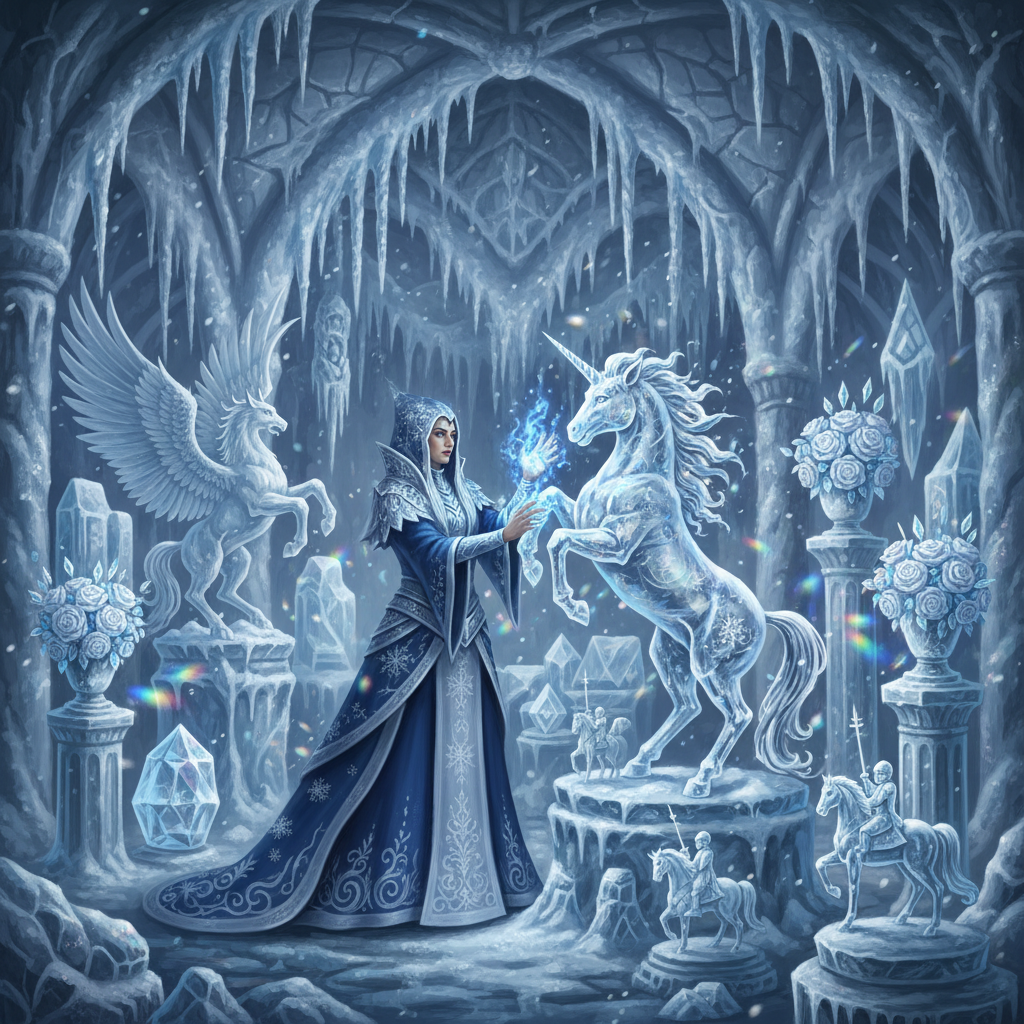
用 nano banana 画一幅奇幻冰法师在冰封工坊里雕冰雕的图像
goose 输出
桌面版
🎨 已用 nano-banana(Gemini 2.5 Flash Image)生成图像!
提示词:「一位奇幻冰法师在冰封工坊里雕冰雕。法师穿着带霜纹的飘逸长袍,双手散发蓝色魔法能量,正在塑造精致的冰雕。工坊里摆满美丽的冰晶作品:冰做的动物、水晶花和精细人偶。天花板垂着冰柱,石墙覆着霜,魔法蓝光照亮空间。雪花轻轻飘过。细致的奇幻艺术风格,带有魔法氛围。」
✨ 完成! 这是你的奇幻冰法师图像。
画面效果很好,包含:
- 冰法师:一位戴兜帽的人物,身着深蓝色长袍,绣有精致的霜花和雪花,双手散发蓝色魔法光
- 冰雕:正在雕琢的独角兽、背景中的飞马、水晶玫瑰花束,以及小型骑士雕像
- 冰封工坊:像冰晶大教堂一样的空间,拱顶垂下戏剧性的冰柱,立柱覆霜,还有几何冰纹
- 魔法氛围:彩虹般的光线折射、飘落的雪粒,以及贯穿整个空间的空灵蓝光
图像已保存到:
generated_imgs/generated-2025-12-04T04-15-47-907Z-3grhec.png
需要我对这张图做修改吗?我可以调整法师外观、增加雕塑、改变光线,或用 continue_editing 微调其他细节。