Fetch 扩展
🎥Plug & Play
Watch the demo
已知限制
Fetch 扩展无法与 Google 模型配合使用(例如 gemini-2.0-flash),因为该扩展在 JSON schema 中使用 format: uri,而 Google 不支持这一点。
本教程介绍如何将 Fetch MCP 服务器 添加为 goose 扩展,以检索和处理来自网页的内容。
快速安装
- goose Desktop
- goose CLI
命令
uvx mcp-server-fetch
配置
信息
运行此命令需要在系统上安装 uv,因为它使用 uvx。
- goose Desktop
- goose CLI
- Launch the installer
- Click
Yesto confirm the installation - Click the button in the top-left to open the sidebar
- Navigate to the chat
- Run the
configurecommand:
goose configure
- Choose to add a
Command-line Extension.
┌   goose-configure
│
◇  What would you like to configure?
│  Add Extension
│
◆  What type of extension would you like to add?
│  ○ Built-in Extension
│  ● Command-line Extension (Run a local command or script)
│  ○ Remote Extension (Streamable HTTP)
└
- Give your extension a name.
┌   goose-configure
│
◇  What would you like to configure?
│  Add Extension
│
◇  What type of extension would you like to add?
│  Command-line Extension
│
◆  What would you like to call this extension?
│  Fetch
└
- Enter the command to run when this extension is used.
┌   goose-configure
│
◇  What would you like to configure?
│  Add Extension
│
◇  What type of extension would you like to add?
│  Command-line Extension
│
◇  What would you like to call this extension?
│  Fetch
│
◆  What command should be run?
│  uvx mcp-server-fetch
└
- Enter the number of seconds goose should wait for actions to complete before timing out. Default is
300seconds.
┌   goose-configure
│
◇  What would you like to configure?
│  Add Extension
│
◇  What type of extension would you like to add?
│  Command-line Extension
│
◇  What would you like to call this extension?
│  Fetch
│
◇  What command should be run?
│  uvx mcp-server-fetch
│
◆  Please set the timeout for this tool (in secs):
│  300
└
- Enter a description for this extension.
┌   goose-configure
│
◇  What would you like to configure?
│  Add Extension
│
◇  What type of extension would you like to add?
│  Command-line Extension
│
◇  What would you like to call this extension?
│  Fetch
│
◇  What command should be run?
│  uvx mcp-server-fetch
│
◇  Please set the timeout for this tool (in secs):
│  300
│
◆  Enter a description for this extension:
│  网页内容获取与处理能力
└
- Choose
Nowhen asked to add environment variables.
┌   goose-configure
│
◇  What would you like to configure?
│  Add Extension
│
◇  What type of extension would you like to add?
│  Command-line Extension
│
◇  What would you like to call this extension?
│  Fetch
│
◇  What command should be run?
│  uvx mcp-server-fetch
│
◇  Please set the timeout for this tool (in secs):
│  300
│
◇  Enter a description for this extension:
│  网页内容获取与处理能力
│
◆  Would you like to add environment variables?
│  No
│
└  Added Fetch extension
使用示例
让我们用 Fetch 扩展从 Official Joke API 获取随机程序员笑话。
信息
虽然这个 API 不需要 API 密钥,但很多 API 需要。如果需要提供 API 密钥,可以把它设为环境变量,并告诉 goose 变量名。例如:“从 weatherapi 获取新奥尔良明天的天气。不要直接使用密钥,而是使用一个从环境变量 WEATHER_API_KEY 取值的脚本”
goose 提示词
做一个给程序员讲笑话的网页。页面应向用户展示笑话的铺垫,让他们猜测笑点,然后告诉他们对不对。包含一个按钮,让他们可以再要一个笑话。你可以从 official joke api 获取笑话
goose 输出
我来帮你创建一个使用 Official Joke API 展示程序员笑话的网页。步骤如下:

首先,核实 API 端点,看看返回什么样的数据
然后创建一个具备必要结构的 HTML 文件
添加 JavaScript 来处理交互

先检查 API:


FETCH
url: https://official-joke-api.appspot.com/jokes/programming/random

输出
Content type application/json; charset=utf-8 无法简化为 markdown,但原始内容如下:
https://official-joke-api.appspot.com/jokes/programming/random 的内容:
[{"type":"programming","setup":"A SQL query walks into a bar, walks up to two tables and asks...","punchline":"'Can I join you?'","id":23}]

很好!现在我将创建带有必要结构和 JavaScript 代码的 HTML 文件:

TEXT_EDITOR
command: write
file_text:
<!DOCTYPE html> <html lang="en"> <head> <meta charset="U...
path:
programmer_jokes.html

输出
programmer_jokes.html


[... programmer_jokes.html 的内容 ...]

我创建了一个完整的网页,它会:

从 Official Joke API 获取随机程序员笑话
展示笑话的铺垫
提供输入框让用户猜测笑点
显示他们猜对还是猜错
在猜测后显示真正的笑点
包含一个按钮来获取另一个笑话

页面还包括:
干净、现代的样式
API 失败时的错误处理
在桌面和移动端都能工作的响应式设计
对正确/错误答案的视觉反馈
猜测后禁用输入,防止多次尝试
你可以在浏览器中打开 programmer_jokes.html 试一试。需要我帮你测试,或调整设计或功能吗?
结果
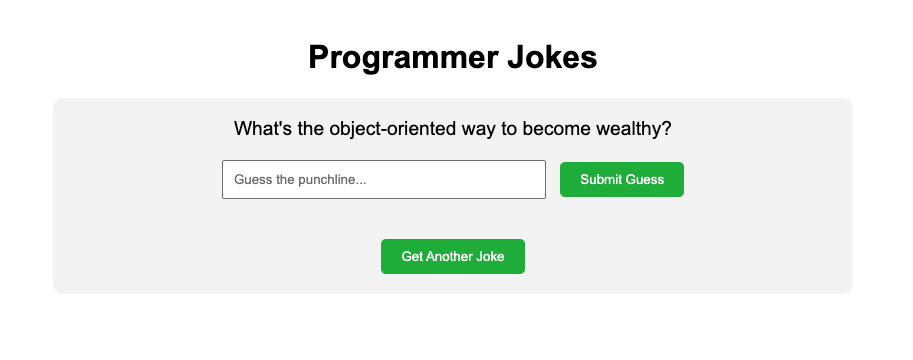
源代码
programmer_jokes.html
<!DOCTYPE html>
<html lang="en">
<head>
    <meta charset="UTF-8">
    <meta name="viewport" content="width=device-width, initial-scale=1.0">
    <title>Programmer Jokes</title>
    <style>
        body {
            font-family: Arial, sans-serif;
            max-width: 800px;
            margin: 0 auto;
            padding: 20px;
            text-align: center;
        }
        .container {
            background-color: #f5f5f5;
            padding: 20px;
            border-radius: 10px;
            margin-top: 20px;
        }
        .setup {
            font-size: 1.2em;
            margin-bottom: 20px;
        }
        .guess-container {
            margin-bottom: 20px;
        }
        #guessInput {
            padding: 10px;
            width: 300px;
            margin-right: 10px;
        }
        button {
            padding: 10px 20px;
            background-color: #4CAF50;
            color: white;
            border: none;
            border-radius: 5px;
            cursor: pointer;
        }
        button:hover {
            background-color: #45a049;
        }
        .result {
            margin-top: 20px;
            font-weight: bold;
        }
        .correct {
            color: green;
        }
        .incorrect {
            color: red;
        }
        #punchline {
            display: none;
            margin-top: 20px;
            font-style: italic;
        }
    </style>
</head>
<body>
    <h1>Programmer Jokes</h1>
    <div class="container">
        <div id="setup" class="setup">Loading joke...</div>
        <div class="guess-container">
            <input type="text" id="guessInput" placeholder="Guess the punchline...">
            <button onclick="checkGuess()">Submit Guess</button>
        </div>
        <div id="result" class="result"></div>
        <div id="punchline"></div>
        <button onclick="getNewJoke()" style="margin-top: 20px;">Get Another Joke</button>
    </div>

    <script>
        let currentJoke = null;

        async function getNewJoke() {
            try {
                const response = await fetch('https://official-joke-api.appspot.com/jokes/programming/random');
                const jokes = await response.json();
                currentJoke = jokes[0];

                document.getElementById('setup').textContent = currentJoke.setup;
                document.getElementById('guessInput').value = '';
                document.getElementById('result').textContent = '';
                document.getElementById('punchline').style.display = 'none';
                document.getElementById('guessInput').disabled = false;
            } catch (error) {
                document.getElementById('setup').textContent = 'Error loading joke. Please try again.';
            }
        }

        function checkGuess() {
            const guess = document.getElementById('guessInput').value.trim().toLowerCase();
            const punchline = currentJoke.punchline.toLowerCase();
            const resultElement = document.getElementById('result');
            const punchlineElement = document.getElementById('punchline');

            if (guess === punchline) {
                resultElement.textContent = 'Correct! You got it! 🎉';
                resultElement.className = 'result correct';
            } else {
                resultElement.textContent = 'Not quite! Here\'s the punchline:';
                resultElement.className = 'result incorrect';
            }

            punchlineElement.textContent = currentJoke.punchline;
            punchlineElement.style.display = 'block';
            document.getElementById('guessInput').disabled = true;
        }

        // Load first joke when page loads
        getNewJoke();
    </script>
</body>
</html>