gotoHuman 扩展
本教程介绍如何将 gotoHuman MCP 服务器 添加为 goose 扩展,把人工审批引入你的 AI 工作流。借助 gotoHuman,goose 可以暂停并请求审阅后再继续,非常适合博客草稿、代码评审、合规检查等场景。
快速安装
- goose Desktop
- goose CLI
命令
npx -y @gotohuman/mcp-server
环境变量
GOTOHUMAN_API_KEY: <YOUR_API_KEY>
配置
- goose Desktop
- goose CLI
- Launch the installer
- Click
Yesto confirm the installation - Get your GOTOHUMAN_API_KEY and paste it in
- Click
Add Extension - Click the button in the top-left to open the sidebar
- Navigate to the chat
- Run the
configurecommand:
goose configure
- Choose to add a
Command-line Extension.
┌   goose-configure
│
◇  What would you like to configure?
│  Add Extension
│
◆  What type of extension would you like to add?
│  ○ Built-in Extension
│  ● Command-line Extension (Run a local command or script)
│  ○ Remote Extension (Streamable HTTP)
└
- Give your extension a name.
┌   goose-configure
│
◇  What would you like to configure?
│  Add Extension
│
◇  What type of extension would you like to add?
│  Command-line Extension
│
◆  What would you like to call this extension?
│  gotoHuman MCP
└
- Enter the command to run when this extension is used.
┌   goose-configure
│
◇  What would you like to configure?
│  Add Extension
│
◇  What type of extension would you like to add?
│  Command-line Extension
│
◇  What would you like to call this extension?
│  gotoHuman MCP
│
◆  What command should be run?
│  npx -y @gotohuman/mcp-server
└
- Enter the number of seconds goose should wait for actions to complete before timing out. Default is
300seconds.
┌   goose-configure
│
◇  What would you like to configure?
│  Add Extension
│
◇  What type of extension would you like to add?
│  Command-line Extension
│
◇  What would you like to call this extension?
│  gotoHuman MCP
│
◇  What command should be run?
│  npx -y @gotohuman/mcp-server
│
◆  Please set the timeout for this tool (in secs):
│  300
└
- Enter a description for this extension.
┌   goose-configure
│
◇  What would you like to configure?
│  Add Extension
│
◇  What type of extension would you like to add?
│  Command-line Extension
│
◇  What would you like to call this extension?
│  gotoHuman MCP
│
◇  What command should be run?
│  npx -y @gotohuman/mcp-server
│
◇  Please set the timeout for this tool (in secs):
│  300
│
◆  Enter a description for this extension:
│  用于人工审批的 gotoHuman MCP 服务器
└
- Add an environment variable for this extension.
信息
获取你的 gotoHuman API KEY 并粘贴到此处
┌   goose-configure
│
◇  What would you like to configure?
│  Add Extension
│
◇  What type of extension would you like to add?
│  Command-line Extension
│
◇  What would you like to call this extension?
│  gotoHuman MCP
│
◇  What command should be run?
│  npx -y @gotohuman/mcp-server
│
◇  Please set the timeout for this tool (in secs):
│  300
│
◇  Enter a description for this extension:
│  用于人工审批的 gotoHuman MCP 服务器
│
◆  Would you like to add environment variables?
│  Yes
│
◇  Environment variable name:
│  GOTOHUMAN_API_KEY
│
◇  Environment variable value:
│  <YOUR_API_KEY>
│
◇  Add another environment variable?
│  No
│
└  Added gotoHuman MCP extension
使用示例
开始之前
登录 app.gotohuman.com,进入 Review Templates → Create Template。
按步骤创建模板,并确保设置了 Webhook Endpoint(测试时可以使用 webhook.site)。
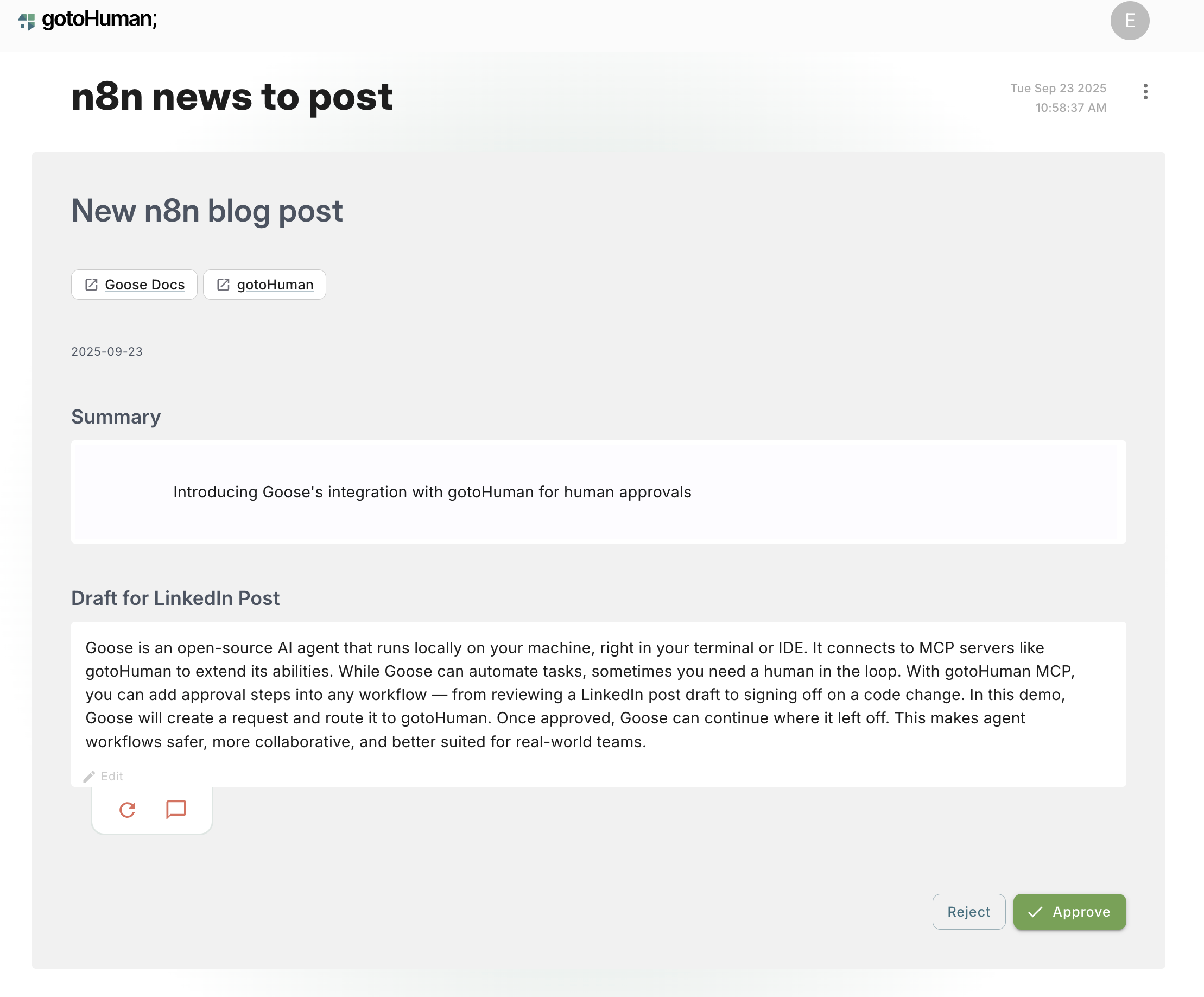
在这个示例中,goose 使用已创建的 n8n news to post 模板,把一篇 LinkedIn 帖子草稿发送到 gotoHuman 进行审批。
- goose Desktop
- goose CLI
- 在 goose Desktop 中打开一个新会话
- 打开终端并启动一个新的 goose 会话:
goose session
goose 提示词
使用我的 `n8n news to post` 表单,把这篇关于 goose 的博客草稿发送到 gotoHuman 进行审阅。

时间戳使用今天的日期,链接如下:
[goose Docs: https://goose-docs.ai/, gotoHuman: https://gotohuman.com/],
摘要写成 “Introducing goose’s integration with gotoHuman for human approvals”,
草稿如下:

goose 是一个开源 AI 代理,在你的机器上本地运行,就在终端或 IDE 里。
它连接到 gotoHuman 等 MCP 服务器来扩展能力。虽然 goose 可以自动化任务,
有时你仍需要人工介入。借助 gotoHuman MCP,你可以在任何工作流中加入审批步骤;
从审阅 LinkedIn 帖子草稿,到签核代码变更。
一旦获批,goose 可以从停下的地方继续。
这让代理工作流更安全、更协作,也更适合真实团队。
goose 输出
桌面版
─── list-forms ──────────────────────────
现在让我搜索一些具体的设置和使用信息:
─── Get-Form-Schema
让我搜索更多技术细节和示例:
─── Request-human-review-with-form ────────────
很好!我已成功使用你的 “n8n news to post” 表单,把 goose 博客草稿发送到 gotoHuman 进行审阅。提交内容如下: 审阅请求详情
- 使用的表单:n8n news to post
- 审阅 ID:6Tp7Z0lqH7lu52MfuHZq
- 审阅链接:https://app.gotohuman.com/accounts/3kiXJvmf4UDBPKPi9ZNY/reviews/6Tp7Z0lqH7lu52MfuHZq
提交的内容
- 时间戳:2025-09-23
- 摘要:Introducing goose’s integration with gotoHuman for human approvals
- 链接:
- goose Docs
- gotoHuman
- 草稿:你关于 goose 与 gotoHuman 集成的完整博客文章
审阅请求已创建,正在等待人工审批。你可以通过上面的审阅链接访问它。审阅完成后,你就可以继续发布,或按要求修改博客文章。
在 gotoHuman 中审阅
现在如果你打开 goose 输出中的 审阅链接,就会在 gotoHuman 控制台中看到等待处理的请求: