Dev.to 扩展
Watch the demo
本教程介绍如何将 Dev.to MCP 服务器 添加为 goose 扩展,以访问 Dev.to 公共 API。有了这个扩展,goose 可以获取文章、标签、用户信息、评论等,无需身份验证。
- goose Desktop
- goose CLI
使用 goose configure 添加 Remote Extension (Streamable HTTP) 扩展类型,并填写:
端点 URL
http://localhost:3000/mcp
必要准备
添加扩展之前,请确保 Dev.to MCP 服务器正在运行
配置
请确保已安装 Node.js 和 npm。使用服务器之前,还需要运行一次 npm install 和 npm run build。
- 首先,克隆并设置
Dev.to MCP server:
git clone https://github.com/nickytonline/dev-to-mcp.git
cd dev-to-mcp
npm install
npm run build # one-time setup
npm start
服务器现在将运行在:
http://localhost:3000/mcp
- goose Desktop
- goose CLI
- Launch the installer
- Click
Yesto confirm the installation - Click the button in the top-left to open the sidebar
- Navigate to the chat
- Run the
configurecommand:
goose configure
- Choose to add a
Remote Extension (Streamable HTTP).
┌   goose-configure
│
◇  What would you like to configure?
│  Add Extension
│
◆  What type of extension would you like to add?
│  ○ Built-in Extension
│  ○ Command-line Extension
│  ● Remote Extension (Streamable HTTP) (Connect to a remote extension via MCP Streamable HTTP)
└
- Give your extension a name.
┌   goose-configure
│
◇  What would you like to configure?
│  Add Extension
│
◇  What type of extension would you like to add?
│  Remote Extension (Streamable HTTP)
│
◆  What would you like to call this extension?
│  dev.to
└
- Enter the Streamable HTTP endpoint URI.
┌   goose-configure
│
◇  What would you like to configure?
│  Add Extension
│
◇  What type of extension would you like to add?
│  Remote Extension (Streamable HTTP)
│
◇  What would you like to call this extension?
│  dev.to
│
◆  What is the Streamable HTTP endpoint URI?
│  http://localhost:3000/mcp
└
- Enter the number of seconds goose should wait for actions to complete before timing out. Default is
300seconds.
┌   goose-configure
│
◇  What would you like to configure?
│  Add Extension
│
◇  What type of extension would you like to add?
│  Remote Extension (Streamable HTTP)
│
◇  What would you like to call this extension?
│  dev.to
│
◇  What is the Streamable HTTP endpoint URI?
│  http://localhost:3000/mcp
│
◆  Please set the timeout for this tool (in secs):
│  300
└
- Enter a description for this extension.
┌   goose-configure
│
◇  What would you like to configure?
│  Add Extension
│
◇  What type of extension would you like to add?
│  Remote Extension (Streamable HTTP)
│
◇  What would you like to call this extension?
│  dev.to
│
◇  What is the Streamable HTTP endpoint URI?
│  http://localhost:3000/mcp
│
◇  Please set the timeout for this tool (in secs):
│  300
│
◆  Enter a description for this extension:
│  访问 Dev.to 文章和内容
└
- Choose
Nowhen asked to add custom headers.
┌   goose-configure
│
◇  What would you like to configure?
│  Add Extension
│
◇  What type of extension would you like to add?
│  Remote Extension (Streamable HTTP)
│
◇  What would you like to call this extension?
│  dev.to
│
◇  What is the Streamable HTTP endpoint URI?
│  http://localhost:3000/mcp
│
◇  Please set the timeout for this tool (in secs):
│  300
│
◇  Enter a description for this extension:
│  访问 Dev.to 文章和内容
│
◆  Would you like to add custom headers?
│  No
│
└  Added dev.to extension
使用示例
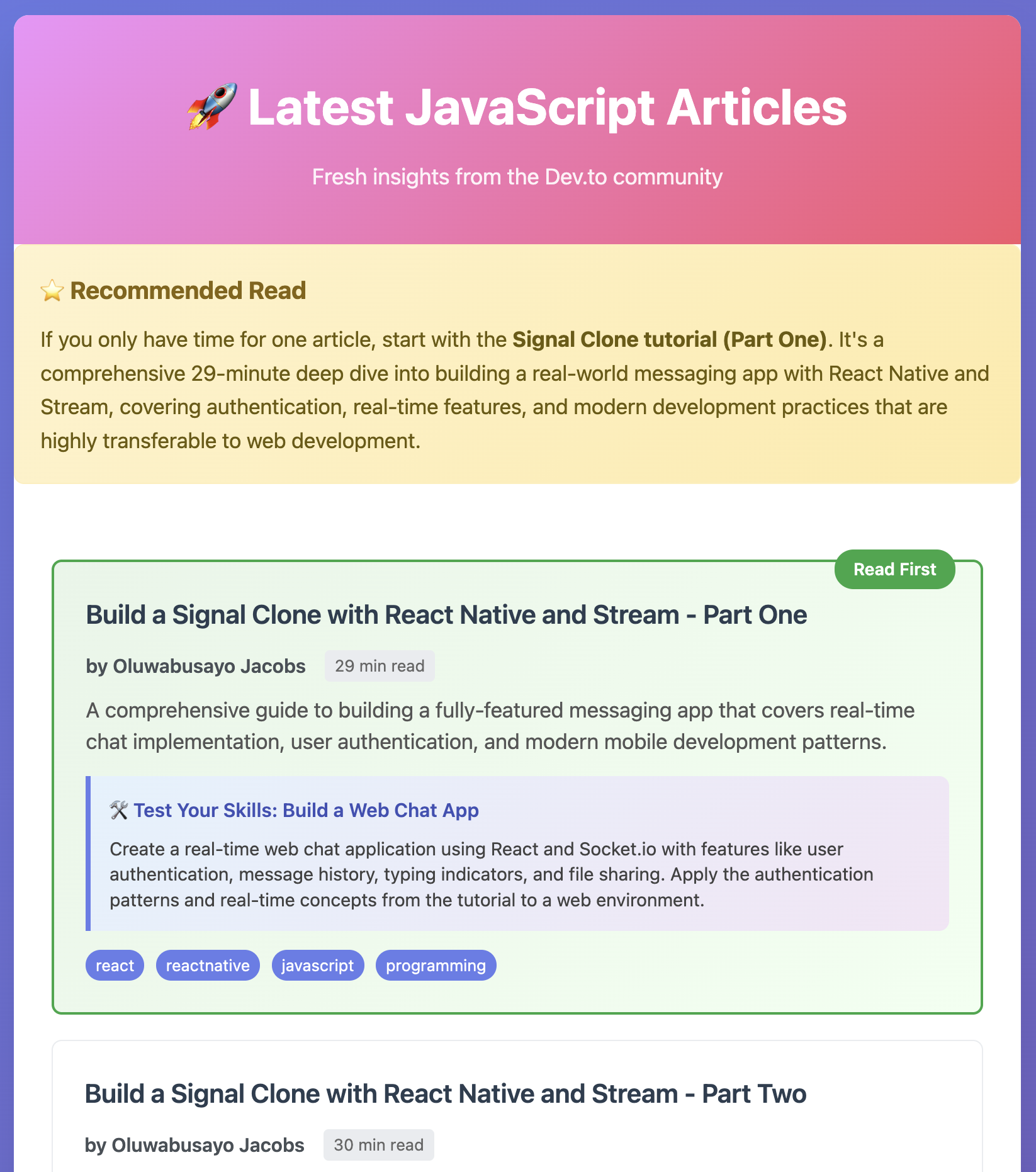
在这个示例中,goose 使用 Dev.to MCP 扩展获取最近 5 篇 JavaScript 文章,并立刻把它们变成个性化的学习中心。
goose 提示词
嘿 goose,从 Dev.to 获取最近 5 篇 JavaScript 文章
创建一个简单的 HTML 落地页,要求:

1. 把每篇文章标题列为可点击链接

2. 在每个标题下包含作者和一句话摘要

3. 为每篇文章建议一个我可以做的小项目或代码片段,用来应用所学(如适用)

4. 如果我只有时间读一篇,标出应该先读哪篇,并解释原因

目标是通过快速展示哪些值得读来节省时间,并通过给出可执行的练习想法帮助我学得更快。
goose 输出
我来帮你从 Dev.to 获取最近的 JavaScript 文章,并创建一个不错的 HTML 学习页面。先获取文章。
─── per_page state tag ──────────────────────────
现在我将创建一个包含所有请求功能的精美 HTML 学习页面:
─── writing /Users/ebonyl/... ──────────────────────────
很好!我创建了一个精美的 HTML 落地页,展示 Dev.to 上最近 5 篇 JavaScript 文章。包含的内容如下:
🎯 主要功能
- 📱 响应式设计,带现代渐变背景和卡片式布局
- 🔗 可点击的文章标题,在新标签页中打开
- 👤 每篇文章的作者姓名和阅读时间
- 📝 一句话摘要,说明每篇文章讲什么
- 🏷️ 标签展示相关技术
- ⭐ 带视觉高亮的优先推荐
- 可动手做的项目,以进一步学习 🎨 设计元素
- 渐变背景和平滑的悬停效果
- 使用系统字体的清晰排版
- 颜色编码的推荐系统
- 在所有设备上都能工作的响应式布局
- 带阴影和动画的专业卡片式设计 📖 内容亮点
首要推荐:Oluwabusayo Jacobs 的 The Signal Clone 教程(第一部分)被标为必读文章,因为:
它是一次全面的 29 分钟深入讲解 涵盖真实世界的消息应用开发 包含身份验证和实时功能 使用 React Native 和 Stream(很容易迁移到 Web 开发) 提供实践性的动手学习体验
落地页已保存为 javascript_articles_landing.html,可以在浏览器中打开!每个文章链接都会直接带你到 Dev.to 上的全文,以便深入阅读。