Excalidraw 扩展
🎥Plug & Play
Watch the demo
本教程介绍如何将 Excalidraw MCP App 添加为 goose 扩展,让 goose 能实时绘制手绘风格的 Excalidraw 图表。
快速安装
- goose Desktop
- goose CLI
添加 Remote Extension (Streamable HTTP) 扩展类型,并填写:
端点 URL
https://excalidraw-mcp-app.vercel.app/mcp
配置
这些步骤配置远程 MCP 服务器。其他部署方式见 Excalidraw MCP App 文档。
- goose Desktop
- goose CLI
- Launch the installer
- Click
Yesto confirm the installation - Click the button in the top-left to open the sidebar
- Navigate to the chat
- Run the
configurecommand:
goose configure
- Choose to add a
Remote Extension (Streamable HTTP).
┌   goose-configure
│
◇  What would you like to configure?
│  Add Extension
│
◆  What type of extension would you like to add?
│  ○ Built-in Extension
│  ○ Command-line Extension
│  ● Remote Extension (Streamable HTTP) (Connect to a remote extension via MCP Streamable HTTP)
└
- Give your extension a name.
┌   goose-configure
│
◇  What would you like to configure?
│  Add Extension
│
◇  What type of extension would you like to add?
│  Remote Extension (Streamable HTTP)
│
◆  What would you like to call this extension?
│  Excalidraw
└
- Enter the Streamable HTTP endpoint URI.
┌   goose-configure
│
◇  What would you like to configure?
│  Add Extension
│
◇  What type of extension would you like to add?
│  Remote Extension (Streamable HTTP)
│
◇  What would you like to call this extension?
│  Excalidraw
│
◆  What is the Streamable HTTP endpoint URI?
│  https://excalidraw-mcp-app.vercel.app/mcp
└
- Enter the number of seconds goose should wait for actions to complete before timing out. Default is
300seconds.
┌   goose-configure
│
◇  What would you like to configure?
│  Add Extension
│
◇  What type of extension would you like to add?
│  Remote Extension (Streamable HTTP)
│
◇  What would you like to call this extension?
│  Excalidraw
│
◇  What is the Streamable HTTP endpoint URI?
│  https://excalidraw-mcp-app.vercel.app/mcp
│
◆  Please set the timeout for this tool (in secs):
│  300
└
- Enter a description for this extension.
┌   goose-configure
│
◇  What would you like to configure?
│  Add Extension
│
◇  What type of extension would you like to add?
│  Remote Extension (Streamable HTTP)
│
◇  What would you like to call this extension?
│  Excalidraw
│
◇  What is the Streamable HTTP endpoint URI?
│  https://excalidraw-mcp-app.vercel.app/mcp
│
◇  Please set the timeout for this tool (in secs):
│  300
│
◆  Enter a description for this extension:
│  用于绘图的 Excalidraw MCP App
└
- Choose
Nowhen asked to add custom headers.
┌   goose-configure
│
◇  What would you like to configure?
│  Add Extension
│
◇  What type of extension would you like to add?
│  Remote Extension (Streamable HTTP)
│
◇  What would you like to call this extension?
│  Excalidraw
│
◇  What is the Streamable HTTP endpoint URI?
│  https://excalidraw-mcp-app.vercel.app/mcp
│
◇  Please set the timeout for this tool (in secs):
│  300
│
◇  Enter a description for this extension:
│  用于绘图的 Excalidraw MCP App
│
◆  Would you like to add custom headers?
│  No
│
└  Added Excalidraw extension
使用示例
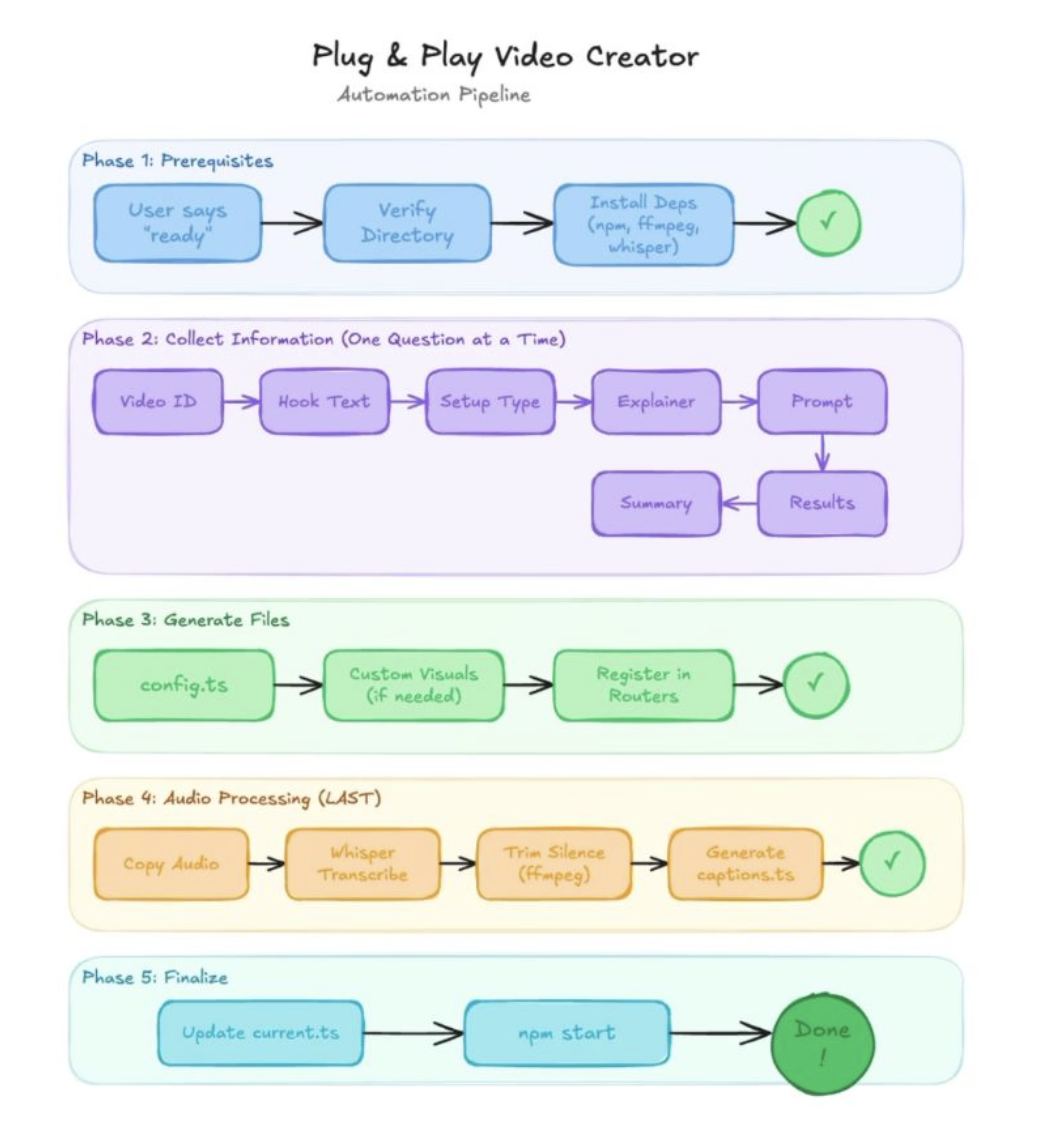
在这个示例中,我们用 Excalidraw MCP App 让 goose 实时可视化它自己的自动化流水线。这展示了 goose 如何连接实时工具、推理工作流,并逐个元素生成结构化图表。
goose 提示词
嘿 goose,请查看我的视频自动化配方,并为我创建自动化流水线的可视化图。我希望线条干净、标签清晰。
goose 输出
─── reading /Users/ebonyl/Desktop/plug-and-play-video.yaml ──────────────────────────

─── Create View elements: [ {"type":"cameraUpdate","width":600}, ...] ──────────────────────────